Alerts and notifications
SPOT separates investigation from configuration:
- Global Alerts is a read-only control center for viewers and admins.
- Configuration → Alerts contains connectors, rules, and ML coverage; changes require admin.
The control center uses the same surfaces, tables, selection, and search as the other operational views. Search supports clearing and Enter-to-apply while remaining responsive. The page starts directly with Alert Control Center, without a preceding technical label. It has two views:
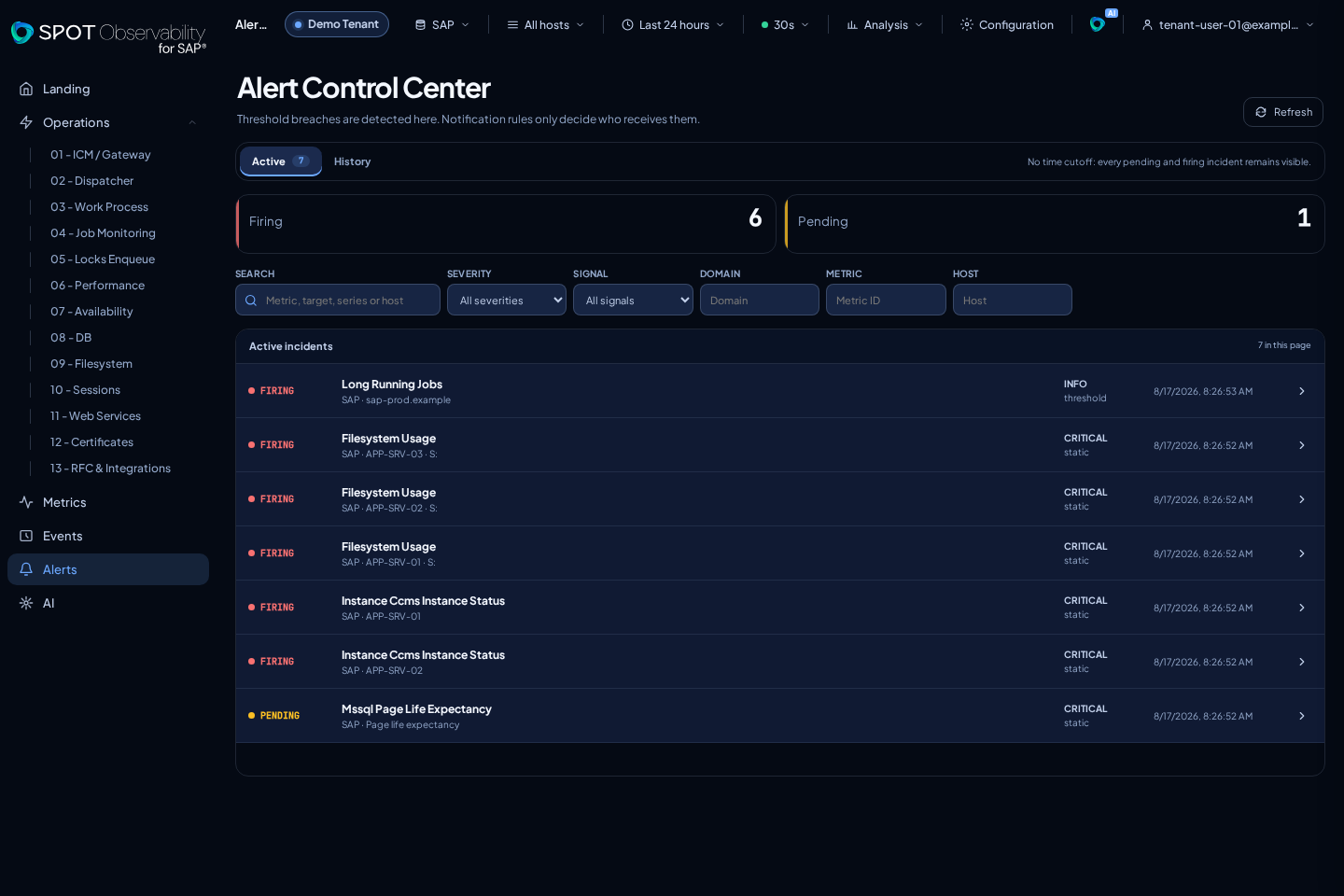
- Active opens by default and includes every
pendingandfiringincident, even when no notification rule exists. - History keeps previous states, recoveries, timeline, and deliveries.
SPOT detects an incident from the effective thresholds for each source, metric, parameter set, series, and host. Rules do not create the incident: they only decide which incidents are notified and through which connector. Details show the target name, metric, series/host, observed value, static thresholds, ML score and state, readable reason, and related notification routes. Open in Metrics Explorer continues the investigation with the affected metric.
Direction is part of the metric contract: higher values are usually worse, while lower values are worse for free-capacity and hit-ratio metrics. For example, mssql-file-free-percent treats warning 15% and critical 5% as lower bounds; 98% free is healthy.
Connectors
SaaS provides a platform-managed SPOT Email connector. Rules can use it, but tenants cannot edit or delete it. Email recipients are selected on each rule. On-prem supports multiple email connectors:
- Generic SMTP with STARTTLS.
- Microsoft 365 relay through MX and port 25, identified by public IP or client certificate.
- Microsoft 365 OAuth2 through
smtp.office365.com:587, an Entra tenant, client ID, and client secret.
Do not use username/password authentication for Microsoft 365. Select Test to verify TLS, authentication, and real delivery.
Webhooks support POST or PUT, timeout, non-sensitive headers, an allowlisted JSON body template, basic, bearer, or secret-header authentication, private CA, and mTLS. The URL cannot contain credentials, query parameters, or fragments; use the write-only secrets object for authentication. SaaS requires public HTTPS and blocks private, loopback, link-local, and metadata destinations. On-prem may reach internal endpoints; HTTP or insecure TLS requires explicit activation.
Secrets are write-only and are never returned after they are saved. SPOT retains a saved secret only while the connector kind, network destination, and authentication identity remain unchanged. If you change a webhook URL or authentication mode, or an email connector's preset, server, port, TLS, or OAuth/SMTP identity, re-enter the complete credential set. A mask or empty field does not authorize forwarding the previous secret to the new destination.
Create and activate a notification rule
- Select all alertable metrics, an Operations domain, or specific metrics.
- Optionally restrict sources/targets and hosts. An empty selection means all.
- Select Static, ML, or Static + ML.
- For both conditions, choose Any (OR), the default, or All (AND).
- Select one or more connectors and save the draft.
- Review the preview: SPOT lists the matching active incidents and the projected email or webhook fan-out per series and host.
- Activate with Future only to notify only later transitions, or Notify current to include matches that are already
firing.
The rule uses the effective thresholds for each metric and source. Threshold values are not copied into the rule, so a later Thresholds update takes effect on the next evaluation.
If several enabled rules match the same incident, each rule keeps its own notification route. The preview exposes that overlap before activation. More than 20 current matches require explicit confirmation.
Alert lifecycle
pending: the condition has just appeared and is already visible under Active.firing: ML requires 2 distinct anomalous observations over at least 5 minutes; a score-100 event with extreme impact may open from one.unknown: data is missing and reminders are suspended.resolved: 2 healthy evaluations have been observed.
Incident identity combines source, metric, parameter set, series, and host without depending on a rule. By default, an enabled rule sends hourly reminders for an open alert and sends a recovery notification. Each delivery is deduplicated by rule, incident, incident generation, transition, and series/host; retries do not create another event.
Persistence advances only when a new observation arrives. Reading the same bucket again cannot open earlier or duplicate the incident. Direction also matters: an improvement that leaves the expected pattern does not trigger ML.
Deliveries use an idempotent queue with retries. Webhooks receive stable Idempotency-Key and X-SPOT-Delivery-ID headers, while email uses a stable Message-ID. Inspect deliveries inside an alert detail for state, attempt number, and sanitized errors. A connector referenced by an active rule cannot be deleted.
What the email includes
Email uses a branded SPOT HTML template, an embedded logo, and a text alternative. The subject and header identify severity, metric, target name, and series or host; the technical target ID does not replace its name. Recovery messages use a green RESOLVED subject and badge even when the previous incident was critical.
When history is available, the message embeds a CID chart for the previous 12 hours with actual values, effective thresholds, ML evidence, and the point that opened the notification. This also applies to incidents included through Notify current. A flat series is centered with visual padding and identified as Constant, including its value, range, sample count, and thresholds so it cannot be mistaken for an empty chart. If history cannot be retrieved, delivery continues and the email states that the chart is unavailable.
ML rules evaluate observed scores. Forecast-based predictive alerts are not available yet.