Agent logs
Agent logs shows structured events sent by SaaS pull connectors. Use it to diagnose installation, configuration pull, heartbeat, SAP extraction, Elastic writes, and managed upgrades without logging into the host.
Remote logs are best-effort: if a log write fails, the agent does not block SAP extraction or heartbeat. Retention is short and intended for recent troubleshooting.
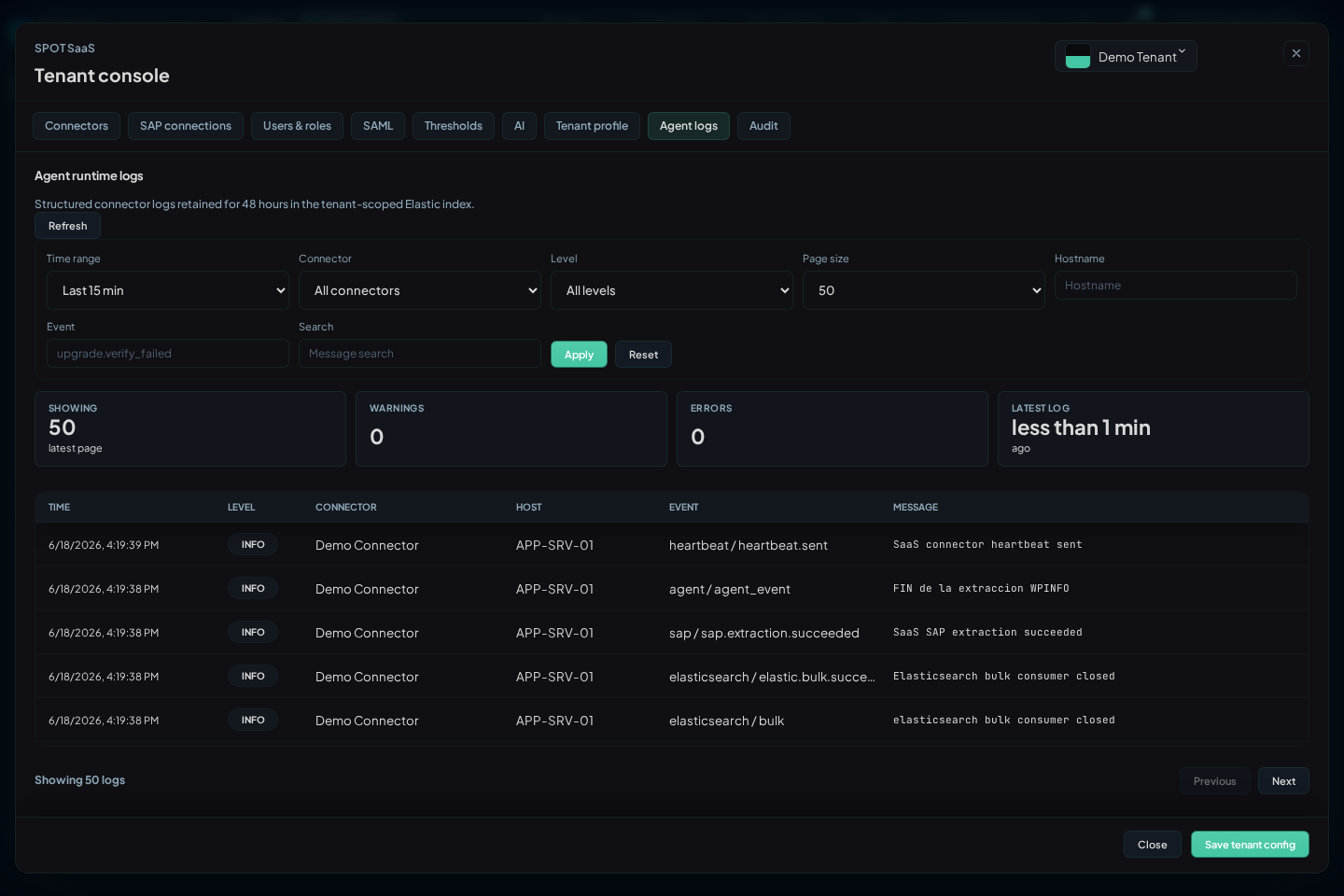
Filters
| Filter | Use |
|---|---|
Time range | Defaults to the last 15 minutes; use wider ranges for upgrades or closed incidents |
Connector | Isolates one runtime when the tenant has several agents |
Level | info, warn, or error; start with error when a connector is NOK |
Hostname | Filters by host reported by the agent; use sanitized names in external reports |
Event | Searches concrete events such as config.pull.failed, sap.extraction.failed, or upgrade.verify_failed |
Search | Free-text search across message and main fields |
Page size | Adjusts rows per page |
The table shows Time, Level, Connector, Host, Event, and Message. Expanding a row shows the full event JSON. Do not paste complete outputs into tickets when they contain internal paths, hostnames, or identifiers; share only the relevant sanitized fragment.
Important Events
| Event Family | Meaning | Next Check |
|---|---|---|
config.pull.started / config.pull.succeeded | The agent is requesting SaaS configuration | Check Config in Connectors if the applied revision does not move |
config.pull.not_modified | Local revision already matches SaaS | Normal when SAP connections or upgrades did not change |
config.pull.failed | The agent cannot fetch configuration | Outbound HTTPS, local credential, re-enrollment |
heartbeat.sent / heartbeat.failed | Connector liveness | If it fails, review network and control plane access |
sap.extraction.started / sap.extraction.succeeded | SAP extraction is running or complete | Cross-check Metrics and Operations |
sap.extraction.failed | RFC, SAP permissions, or data availability issue | Review technical user, ASHOST, SYSNR, and enabled family |
sap.collection.schedule.completed | Actual phase and duration for each source/family | Compare scheduled_at, start_delay_ms, duration_ms, and skipped_cycles |
sap.programs.progress | Confirmed Programs coverage by source | Compare coveredThrough, lagSeconds, pendingWindows, and state across observations |
elastic.bulk.succeeded / elastic.bulk.failed | Write to the tenant target | If it fails, review ingest connectivity and tenant target |
upgrade.* | Download, verification, installation, and restart phases | Cross-check Request upgrade in Connectors |
Diagnosis by Symptom
| Symptom | Recommended Filter | Reading |
|---|---|---|
Connector Pending | Connector + last 30 minutes | If no logs appear, the agent did not start or did not enroll |
Connector Stale | Connector + heartbeat | Heartbeat stopped; review user service or outbound HTTPS |
| Config not applied | Connector + config.pull | If pull fails, re-enroll or review connectivity |
| Empty dashboards | Connector + sap.extraction and elastic.bulk | Separates SAP failure, write failure, or simply no data in range |
| Programs behind | Connector + sap.programs.progress | Compare confirmed coverage with the current time; a newly received document can cover old history |
| Failed upgrade | Connector + upgrade | Validate checksum/signature, disk space, and supervisor |
Cadence and resources
Observed/@timestamp is SAP time, ingested_at is receipt time, and chart
axes show bucket starts. Use all four signals when diagnosing lag. Missed cycles
are coalesced and do not form a queue.
The heartbeat exposes allowlisted aggregate RSS/PSS, heap/GC/cgo, goroutine,
thread, dispatcher, RFC, row, document, and byte counters. Derive CPU between two process_cpu_time_ns values; one cumulative value is not a percentage.
For Programs, coveredThrough and lagSeconds reflect only coverage confirmed by acknowledgement; windowSeconds shows leaf width and pendingWindows pending leaves. current means lag is at most the configured interval plus 120 seconds; catching_up means recovery, and backoff means waiting after a failure. Before the first confirmed cursor, freshness is unknown and coverage and state fields may be absent. Compare successive events: recent receipt alone does not prove Programs is current.
Jobs changes while being read
SAP does not provide a stable snapshot for paginating TBTCO. The connector verifies every complete pass before publishing data. If jobs change between pages, the Jobs cycle ends with a sanitized error, publishes no incomplete view, and does not advance its cursor; the next stable cycle reads again from the beginning. An interruption between a page and its confirmed progress also cannot mix old and new runs. An isolated occurrence can coincide with normal batch activity. If it repeats, review extraction duration, SAP load, and read permissions before increasing intervals or limits.
For tables larger than 500 rows, the connector agrees on one SAP ordering mode
before publishing the first page. A repeated ROWSKIPS or ordering message
means that family did not complete its cycle: check Job Runs or RFC failures
freshness separately, because a healthy aggregate Jobs snapshot does not prove
that those paged lists completed.
The connector collects the complete Job Log for each terminal execution through
the standard BAPI. Collection is asynchronous and does not block the job_runs
cursor or the long-running jobs snapshot. Because SAP does not paginate this
response, a large read may temporarily increase agent memory use. In the
detail, check the manifest: complete or empty are confirmed outcomes;
retrying, too_large, unauthorized, unavailable, or error explains why
the log is not available yet. SPOT never interprets a partial collection as a
complete or empty log.
SAP returns an incomplete structure
Required RFC failures, qRFC, and Certificates tables/lists are validated before publication. If SAP omits a structure, returns an incompatible shape, or stops an enumeration early, the cycle ends with a sanitized error and retains the latest confirmed state. It is not interpreted as zero, an empty list, a removal, or a recovery. An explicitly empty result with the correct structure remains valid.
For Certificates, an empty discovery list does not prevent probing canonical PSE contexts. When one exists, the inventory is published; insufficient permissions, malformed structures, and other RFC errors still fail closed.
CCMS alerts without SAP text
A CCMS alert may contain a valid identity, timestamp, and value while SAP omits its explanatory text. The connector does not discard the cycle: it publishes a stable operational message and marks its source as a fallback. Do not confuse this with an RFC failure. A real authorization error, a corrupt response, or a missing required value still leaves the collection in error and does not advance its watermark.
Extraction diagnostics distinguish eligible nodes, alert candidates, emitted events, message fallbacks, and real failures. The eligible-node count therefore does not represent the number of missing messages.
Relation to Local Logs
The host keeps local logs at:
$HOME/spot-agent-saas/log/spot-agent-sap.log
Use remote logs for normal diagnosis from SPOT. Log into the host only when you need to validate systemd --user, linger, file permissions, or local connectivity.