Non-root SaaS agent
Install the connector with a normal Linux user on a host that can reach SAP over RFC and the exact SPOT origin shown by Tenant Console. Production uses HTTPS. The development environment may show HTTP with an explicit exception and a visible warning. Generations, state, and logs stay below $HOME; the connector does not write to /opt, /etc, or /var.
Before installation
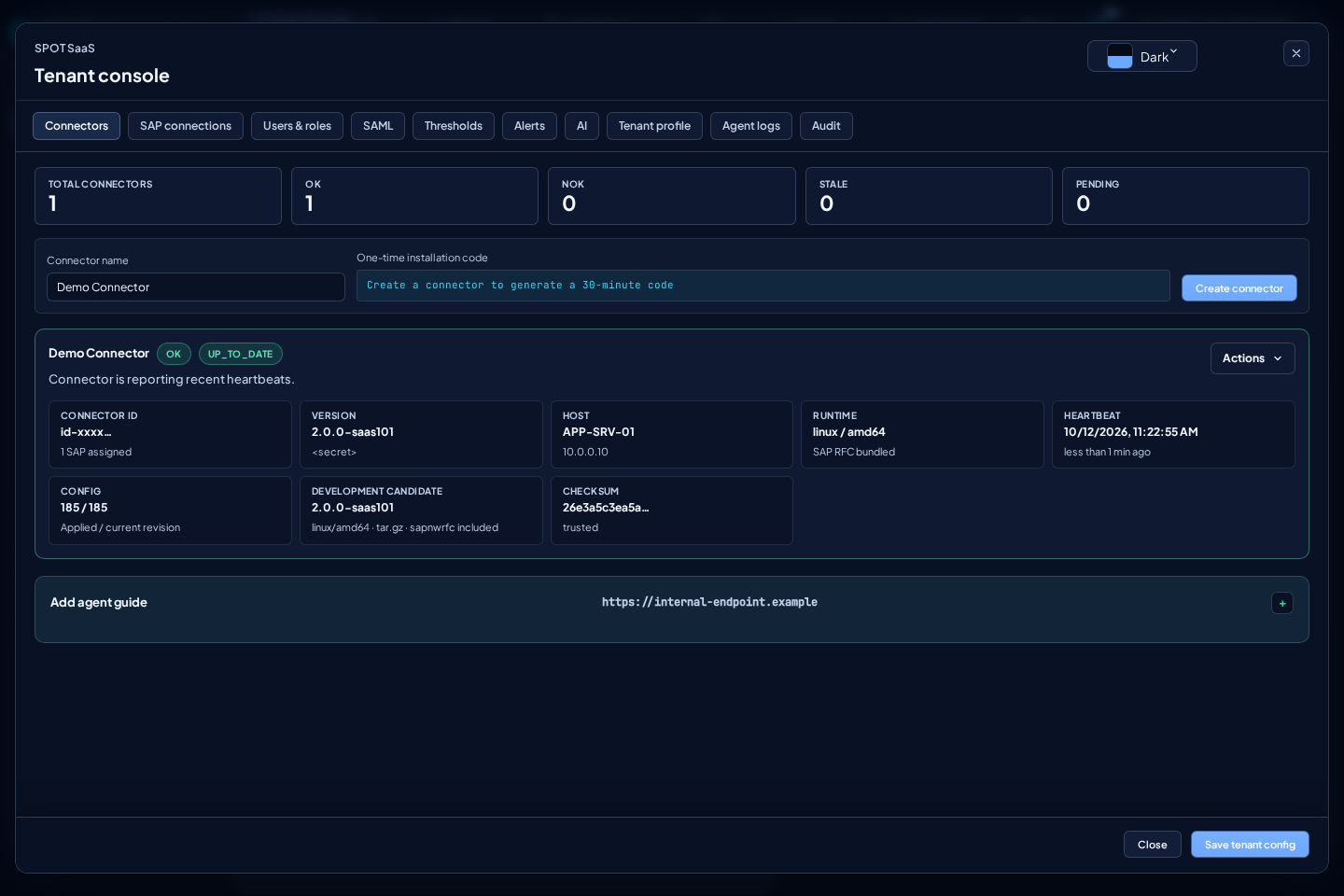
- As a tenant admin, create the connector under
Tenant console > Connectors. - Keep the one-time installation code. It is shown once and remains valid for 30 minutes.
- Open
Add agent guideand generate the temporary bootstrap URL. - Run the guide on the final host as the Linux user that will own the service.
Choose the package and environment
The guide and Download verified bootstrap show Development candidate when
the development environment has a trusted, active candidate for testing. They
select the newest valid generation with a matching bootstrap and signed Linux
amd64 runtime from the same release. Production shows Stable package and
allows only trusted stable packages.
If valid identity, bootstrap or its verified matching runtime is missing,
installation stays blocked and Generate stays disabled. Do not switch
environments or bypass verification to enable it.
Test the candidate in development before requesting manual promotion to
production. Generating a URL or downloading the bootstrap does not upgrade or
re-enroll an existing connector. Request upgrade retains the stable channel;
displaying a development candidate does not enable it as an automatic upgrade.
Download the bootstrap
Download the small binary shown by the console and verify its SHA-256 before execution:
wget -O spot-connector-bootstrap_<version>_linux_amd64 \
  "<temporary-bootstrap-url>"
echo '<bootstrap-sha256>  spot-connector-bootstrap_<version>_linux_amd64' | sha256sum -c -
chmod 0755 spot-connector-bootstrap_<version>_linux_amd64
Do not download or extract the runtime manually and do not use curl | sh. The bootstrap embeds its environment's TUF public root and validates current metadata and the runtime digest before extracting or executing anything. Each environment uses an independent trusted root and repository; a production installation never trusts a non-production root.
If the console reports that no trusted bootstrap has been synchronized from Platform, stop: there is no fallback to a legacy tarball or an unverified download.
Install and enroll
Enable linger once so the user service survives logout:
sudo loginctl enable-linger "$USER"
loginctl show-user "$USER" -p Linger --value
Run the exact command shown by Add agent guide:
./spot-connector-bootstrap_<version>_linux_amd64 \
  --control-plane '<tenant-control-plane-url>' \
  --target '<trusted-runtime-target>' \
  --version '<connector-version>' \
  --start-mode systemd-user
Do not replace the displayed origin with another host. --control-plane must
always use the tenant's canonical SaaS origin. The temporary URL only downloads
the bootstrap and may use a separate download endpoint; it never becomes the
control plane. When the console shows HTTP, the generated command adds
--development-http: this visible
exception is restricted to the canonical SaaS host or loopback and is persisted
by the service launcher. HTTP does not authenticate the server; remove the
exception when SaaS moves to HTTPS. TUF and digest verification remain mandatory.
Enter the code only at the hidden prompt. Never put it in a URL, argument, shell history, log, or stdout. For automation, --install-code-file accepts a temporary 0600 file; remove it afterward.
The connector locally generates its 256-bit persistent credential and SPOT stores only its hash. The local file is atomically written to $HOME/.config/spot/connector.json with mode 0600; never share it.
stat -c '%a %n' "$HOME/.config/spot/connector.json"
Verify the service
systemctl --user status spot-agent-saas.service --no-pager
journalctl --user -u spot-agent-saas.service -n 80 --no-pager
readlink "$HOME/spot-agent-saas/current"
The card moves from Pending to OK after authentication, configuration, a healthy heartbeat, and resumed telemetry.
A canonical installation keeps current -> generations/<version>. The runtime
also recognizes the flat current/ left by an affected updater and normalizes
it atomically during the next upgrade while retaining state and the previous
generation. Do not create the link manually or move those directories: that can
separate the binary from its SDK, state, or configuration.
If the journal reports current/scripts/env.sh: No such file or directory, stop
the service and inspect its unit:
systemctl --user cat spot-agent-saas.service
test -x "$HOME/spot-agent-saas/bin/spot-agent-saas"
test -x "$HOME/spot-agent-saas/scripts/env.sh"
If a legacy connector cannot consume the upgrade at all, preserve
$HOME/.config/spot/connector.json and use the latest verified bootstrap as a
recovery bridge; do not re-enroll or delete the credential. This bridge is
exceptional. systemctl --user enable --now does not restart an already active
unit: if the card still reports the previous version, run
systemctl --user restart spot-agent-saas.service once. The next upgrade must
self-activate without intervention.
If user systemd is unavailable, run a fresh bootstrap with a fresh code and --start-mode nohup.
Resource profile and verification
The signed user-systemd unit applies CPUQuota=200%, MemoryHigh=1G, and
MemoryMax=1280M to the whole process. The runtime keeps GOMAXPROCS=2 and
GOMEMLIMIT=320MiB; the latter is a soft Go-managed-memory target, not a hard
ceiling or a limit on all native memory that the RFC SDK may use. MemoryHigh
introduces pressure before the hard
MemoryMax cgroup limit.
After installation or an upgrade, check the service's effective properties and the PID using them. SPOT keeps the previously confirmed profile while it checks the new generation's health and applies the new signed unit only afterward. A temporary override can change the running service but does not prove that the profile is installed for the next start.
Measure RSS/PSS, memory.high events, PSI, and collection progress under
representative SAP load while retaining headroom for the rest of the host. A
larger native-memory allowance does not prove a leak is resolved, indefinite
stability, or compatibility with every SAP system. Do not bypass health or
rollback checks to force an upgrade.
Upgrades and rollback
SPOT requests stable versions automatically according to the assigned rollout wave. Connectors > Actions > Request upgrade remains a one-off administrative action when available; it never offers a downgrade from a newer candidate to the latest stable. The supervisor verifies TUF, installs a separate generation, atomically switches current, and confirms startup, configuration, authentication, heartbeat, and telemetry. It automatically restores the previous generation when health is not confirmed.
Do not re-enroll to upgrade, replace the tar manually, or restart the service as part of a normal upgrade: the new generation self-activates. SPOT rolls stable out in waves and can pause on heartbeat, telemetry, or rollback degradation.
Re-enrollment and revocation
Generating a re-enrollment code does not revoke the working credential. Replacement occurs only after the new enrollment succeeds. Stop the service when ready, generate the code, and run:
"$HOME/spot-agent-saas/bin/spot-agent-saas" saas-enroll \
  --control-plane '<tenant-control-plane-url>' \
  --save \
  --start
Enter the code at the hidden prompt. Disable connector or Revoke immediately invalidates active credentials, pending codes, sessions, and requested upgrades.
Safe diagnostics
"$HOME/spot-agent-saas/bin/spot-agent-saas" saas-pull-config
tail -n 80 "$HOME/spot-agent-saas/log/spot-agent-sap.log"
Also review Tenant console > Agent logs. Never share connector.json, installation codes, SAP secrets, Elastic keys, or unredacted configuration. Invalid, expired, or tampered TUF metadata and unexpected digests stop installation or upgrade; production has no verification bypass.
Five-minute collections are clock anchored and spread through the first minute
of each block. Observed is the timestamp returned by SAP; the chart bucket
start does not tell you when ingestion finished. If a point appears late,
compare scheduled_at, start_delay_ms, @timestamp, and ingested_at in
Agent logs before changing freshness.
The agent bounds concurrency and coalesces delayed cycles. Heartbeats expose only aggregate CPU, RSS/PSS, heap/GC/cgo, threads, queue, RFC, and export counters. CPU must be derived between two samples; the cumulative value is not an instantaneous percentage.
Environment and scope of verification
Check that the guide's origin belongs to the environment you are using. Development and production keep separate installations and trust; a bootstrap from one environment cannot validate packages from the other. If the canonical SaaS origin changes, use the updated guide and preserve the existing installation's credentials and state according to support instructions. Do not copy a development installation or its data to create a production installation.
A test using demonstration configuration can check installation, enrollment, heartbeat and configuration delivery. It does not prove RFC connectivity, real SAP collection or an upgrade from a previous version. Before treating a SAP connection as operational, also check a recent successful collection and new data from that connection. A healthy heartbeat alone does not prove fresh telemetry.
For a temporary test, preserve existing installations and, afterward, revoke only the test connector and remove its service, directory and temporary installation-code file. Check that the previous connector continues running.